
 TerraPlan
T-walls, wall spacing and offsets
Join an interior wall to another wall, slide it to an exact distance with the green labels, and make offset copies.
Interior walls usually run from one wall to another and meet it in a T. TerraPlan keeps those ends joined, and shows green distances so you can put the wall exactly where you measured it.
Join a wall to another wall
- Pick Walls, then Interior.
- Drag from one wall to the other. The ends snap onto the walls (Meets wall). Against the foundation outline, an end stops on its inside face (Inside face), not on the outside line, even if you let go on the outline or inside the wall's thickness.
- If an end stops short, select the wall and drag that end's green dot close to the other wall. A dashed line shows Joins the wall when you let go. Against the foundation outline, the end joins its inside face.
Set the exact distance
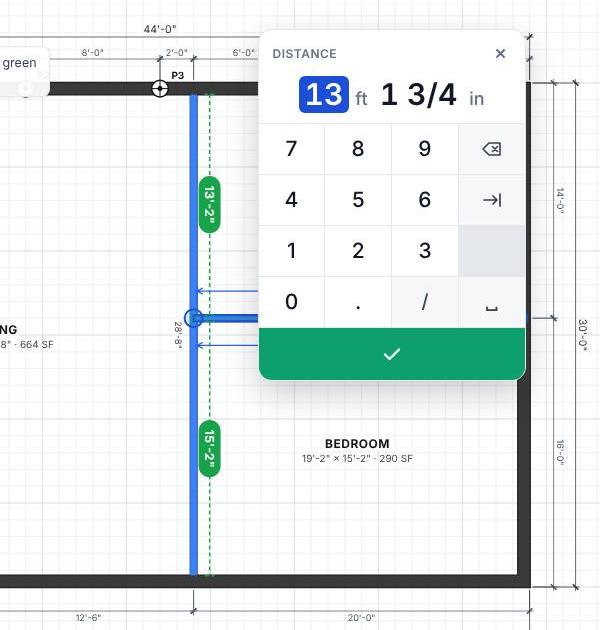
- Select the wall. Green labels show distances, measured face to face:
- For a T-wall, the distance along the wall it stands on, to the corners or to the next wall that meets it.
- For a wall that runs between two walls, the clear space to the wall on each side.
- Tap a green label. The number pad opens with the title Distance.
- Type the distance you measured and tap ✓. The wall moves and its ends stay joined.
Make an offset copy
Offset copies a wall, outline, line or zone a set distance to one side. Use it for a footing line, a second wall of a hallway, or a drain run along the foundation.
- Select the item.
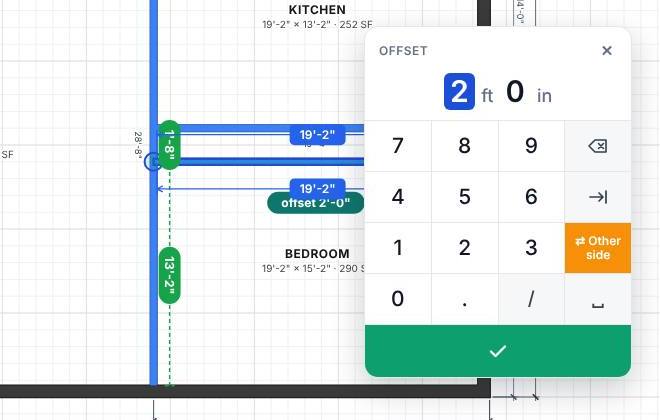
- Tap Offset on the selection column. A copy appears 2 ft away (or the last distance you used) and the pad opens with the title Offset.
- Type the distance and tap ✓.
- Tap ⇄ Other side on the pad to put the copy on the other side.
An offset of a closed outline goes outward. The copy shows a teal label, like "offset 2'-0"". Tap it to change the distance.
Related questions
Why does the green label say 13'-2" when the pad shows 13' 1 3/4"?
The labels on the plan round to the nearest inch. The pad shows the exact distance to 1/16 inch.
My wall won't slide along the other wall.
It may be locked. Tap Unlock on the selection column. If the wall it stands on isn't actually touching it, drag the end onto that wall first.
Thanks for letting us know.
Still need help?
Send us a message and a real person on the Terralox team will get back to you, usually the same business day.