
 TerraPlan
Mirror, rotate, extend and trim
Flip or mirror part of a plan, turn it by an exact angle, run a wall on to the next wall, and cut out the piece between two walls.
These tools live under More on the selection column, except Trim, which is its own tool. They work on one item or a group you've selected.
Rotate
- Turn 90° on the selection column turns the selection a quarter turn.
- For any other angle, tap More, then Rotate by angle. The pad opens with the title Turn by. Type the degrees, tap ↻ Clockwise to switch to ↺ Counter-clockwise if you need to, then tap ✓.
- A door, window or anchor sitting in a wall turns with the wall.
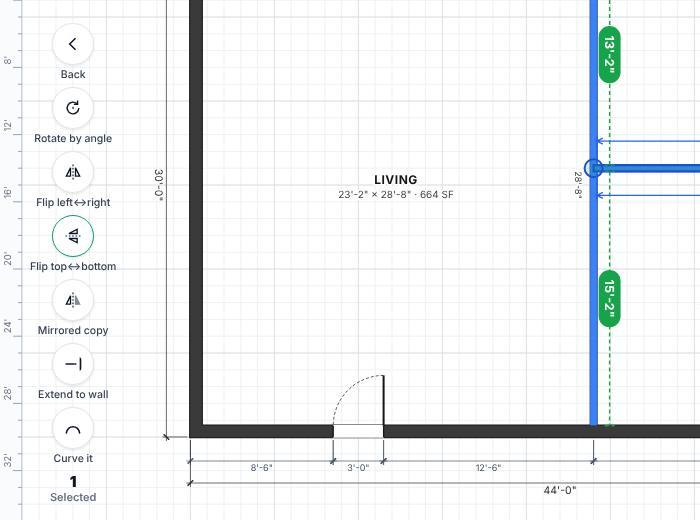
Flip and mirror
- Select what you want to flip. Drag across empty space to select several things.
- Tap More.
- Pick one:
- Flip left↔right or Flip top↔bottom flips it in place.
- Mirrored copy puts a mirrored copy beside it, to the right. Drag it into place, or tap a green distance to place it exactly.
Doors and windows in the walls you flip come along. Check each door's swing after a flip, and use Flip on the door itself if it needs to hinge on the other side.
Extend to the next wall
- Select a wall or line that stops short.
- Tap More, then Extend to wall. Each loose end runs on to the first wall ahead of it.
If nothing is ahead of either end, TerraPlan says "Nothing ahead of either end to extend to."
Trim the piece between two walls
- Tap Select in the tool rail, then Trim.
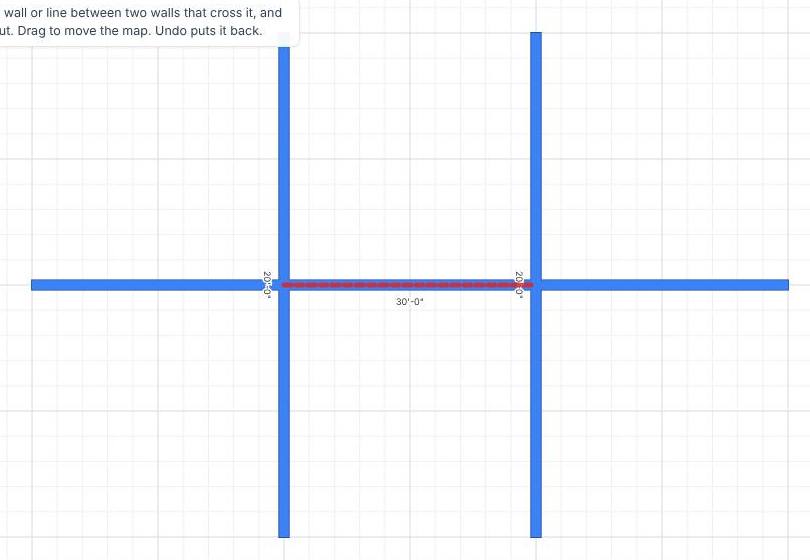
- Tap the piece of a wall or line between the two walls that cross it. That piece is cut out. With a mouse, the piece shows in red dashes before you click.
- Tap more pieces, or tap Undo to put one back.
Was this article helpful?
Thanks for letting us know.
Still need help?
Send us a message and a real person on the Terralox team will get back to you, usually the same business day.