
 TerraPlan
Face dimensions and inside or outside measurements
How TerraPlan shows outside and inside lengths of walls, and how to type the length you actually measured on either face.
A wall has two faces, and on site you measure whichever one you can reach: the outside of the foundation, or the inside of a room. TerraPlan shows both, so you can type the number you wrote down without doing math for the wall thickness.
How the lines are drawn
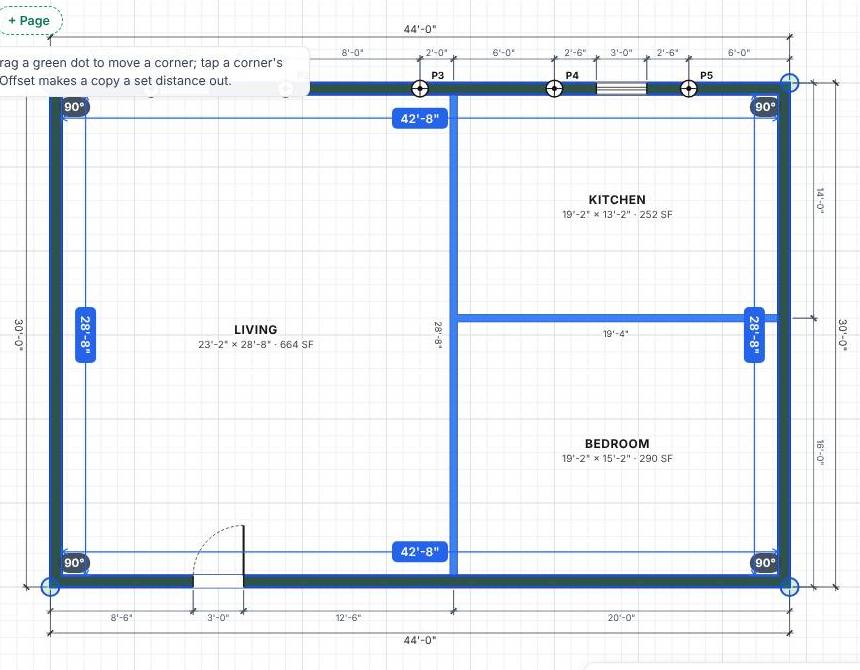
- A closed outline (the outside walls of the house) is drawn on the outside face. The wall thickness, 8 inches to start, grows inward. The gray dimension strings around the house are outside lengths.
- An open wall (an interior wall, or an exterior run that isn't closed) is drawn on its centre line, with half the thickness on each side.
See the face lengths
- Tap a wall or outline to select it.
- Blue labels appear along each face.
- On a closed outline they show the inside length of each side. A 44 ft outside wall with 8-inch walls reads 42'-8" inside.
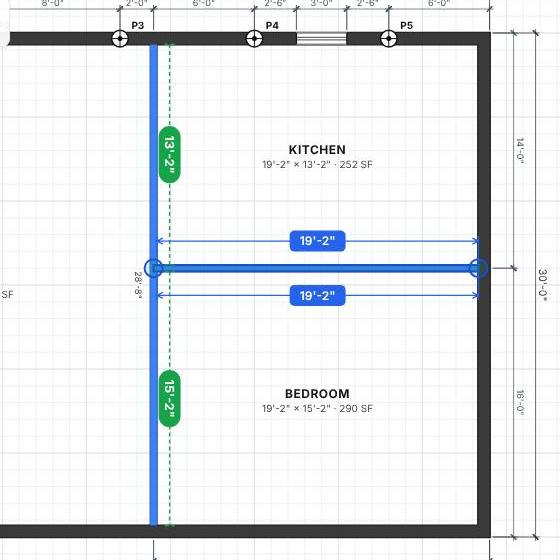
- On an open wall they show both faces, measured face to face where the wall meets other walls.
Type the length you measured
- Select the wall.
- Tap the blue label on the face you measured.
- Type the length on the number pad and tap ✓.
TerraPlan changes the wall so that face is the length you typed. The other face changes by the same amount.
Turn dimension labels on or off
Tap Layers at the bottom right:
- Wall dimensions shows or hides the lengths on walls.
- Dimension strings (walls, doors, piers) shows or hides the strings outside the house that locate doors, windows and piers along each wall.
Hidden dimensions don't print either.
Related questions
How do I add my own dimension line?
Tap Inspect, then Dimension, and drag between the two points. To check a distance without adding anything to the plan, use Measure in the same group.
Why don't the inside lengths add up to the outside length?
They differ by the wall thickness at each end. If they're off by more than that, check the wall's Thickness (inches) in the Edit panel.
Thanks for letting us know.
Still need help?
Send us a message and a real person on the Terralox team will get back to you, usually the same business day.