
 TerraPlan
Print or export the crew install sheet
Give the field crew a one-page PDF with the plan, every pier and where it goes, and a checklist of the other work. Also covers the other exports.
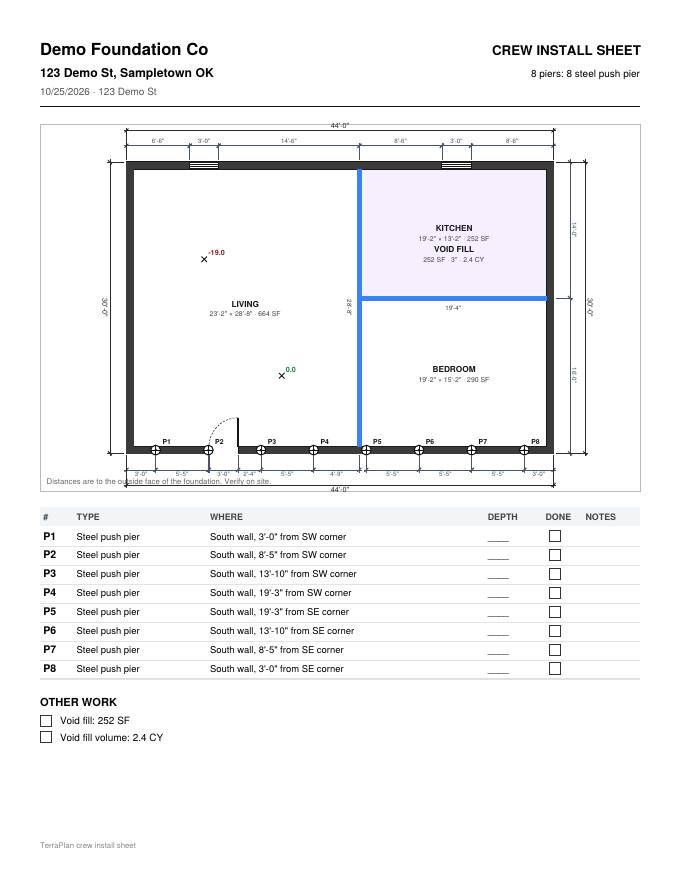
The crew install sheet is a letter-size PDF the crew can work from: the plan at the top, then a table with each pier's number, type and location in words they can tape out.
Steps
- Finish placing the piers. Set Depth (ft) and a Note on any pier that needs one (select it and tap Edit).
- Check that the job address is right in the top bar. It prints at the top of the sheet.
- Tap Export in the top bar.
- Tap Crew install sheet (PDF): piers and where they go.
- The PDF downloads, named after the plan with "-crew-sheet" on the end. Print it or send it to the crew.
What's on the sheet
- Your company name, CREW INSTALL SHEET, the address, the date and how many piers of each type.
- The plan, as large as fits on the top half.
- A row for each pier: #, Type, Where, Depth, a Done box and Notes.
- Where reads like "South wall, 3'-0" from SW corner". A pier inside the house reads "Inside:" with its distance from the west and north walls. North is the top of the plan.
- Blank depth lines to fill in on site when no depth was set.
- OTHER WORK: a checklist of everything else in the takeoff, like void fill or drain line.
Each page of the plan that has a drawing gets its own sheet.
The other exports
The Export menu also has:
- Download PDF (8.5×11) and Download PDF (11×17): the plan on a drawing sheet with a title block, scale, legend and notes. Every page with a drawing prints on its own sheet.
- Download image (PNG): a picture of the open page.
- Send to TerraTopo (heatmap): opens the readings in TerraTopo.
- Send plan PDF to JobTread: shows only when your company has connected JobTread.
Was this article helpful?
Thanks for letting us know.
Still need help?
Send us a message and a real person on the Terralox team will get back to you, usually the same business day.