
 TerraPlan
Curve a wall
Bow a straight wall into an arc for a rounded bay, a curved porch or a radius corner, and set how far it curves out.
A curved wall in TerraPlan starts as a straight wall. You bow it out and type how far the middle sits from the straight line between its ends.
Before you start
- Curve it works on a single straight wall: one line with two ends. A wall that's part of a run with corners doesn't offer it. Tap Done, then draw the curved piece as its own wall from corner to corner.
Steps
- Select the wall.
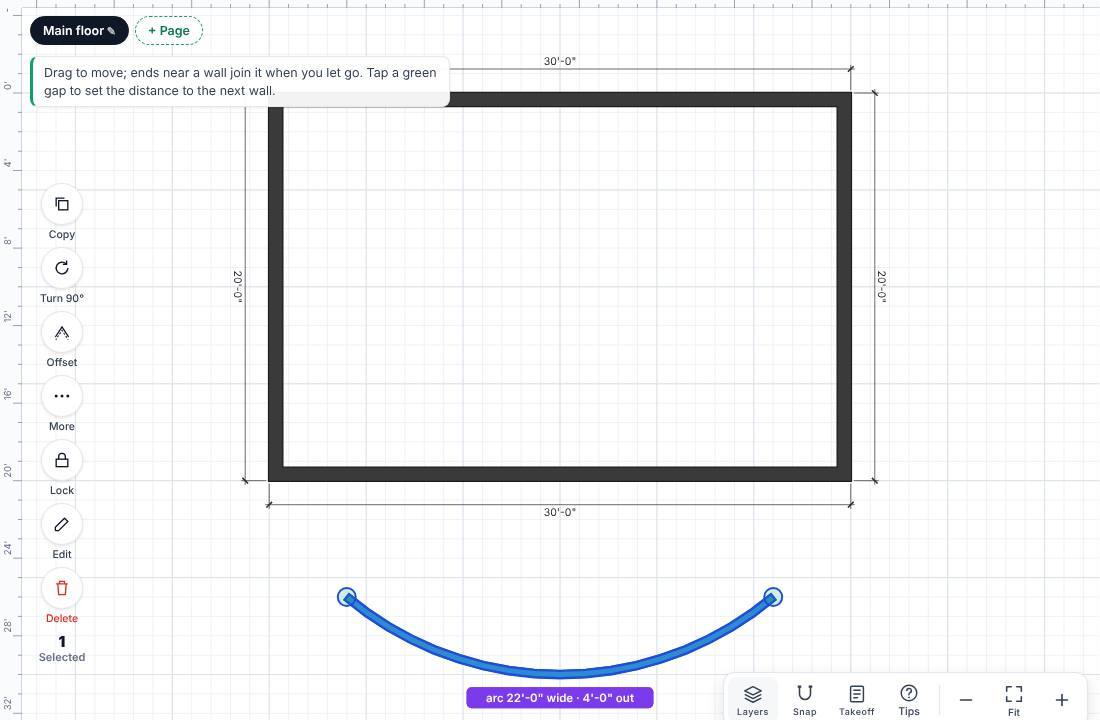
- Tap More on the selection column, then Curve it. The wall bows out and the number pad opens with the title Curves out (0 = straight).
- Type how far the middle of the curve is from the straight line, and tap ✓.
- If it bows the wrong way, tap the purple label, then ⇄ Other side on the pad.
Change it later
- Tap the purple label (for example "arc 22'-0" wide · 4'-0" out") to type a new amount.
- Or select the wall, tap More, then Change curve.
- Type 0 to make the wall straight again.
Drag either end's green dot to move it. The wall keeps its curve between the new end points.
Was this article helpful?
Thanks for letting us know.
Still need help?
Send us a message and a real person on the Terralox team will get back to you, usually the same business day.