
 TerraPlan
Set a corner angle
Type the exact angle at any corner of a wall run or outline, for bay walls, angled corners and houses that aren't square.
Most corners are 90 degrees, but bay walls, angled entries and older houses aren't. Every corner of a selected wall run shows its angle, and you can type a new one.
Steps
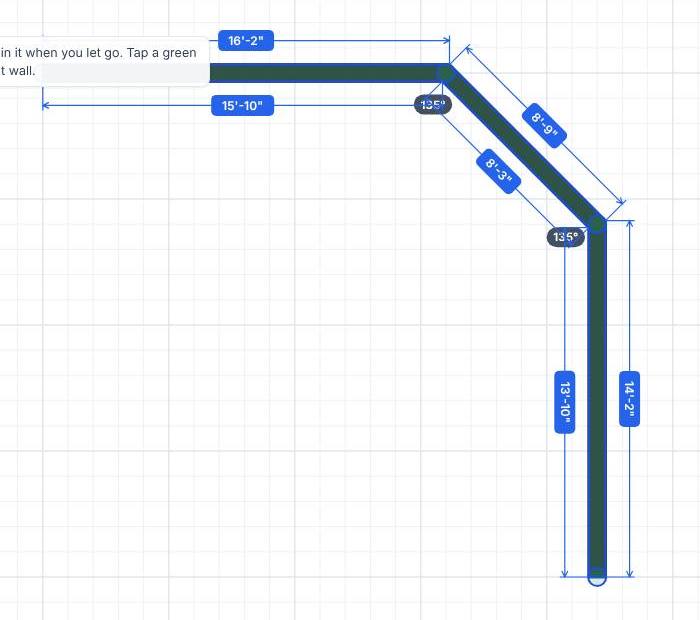
- Select the wall run, outline or line. Gray labels appear at each corner with its angle, like 90° or 135°.
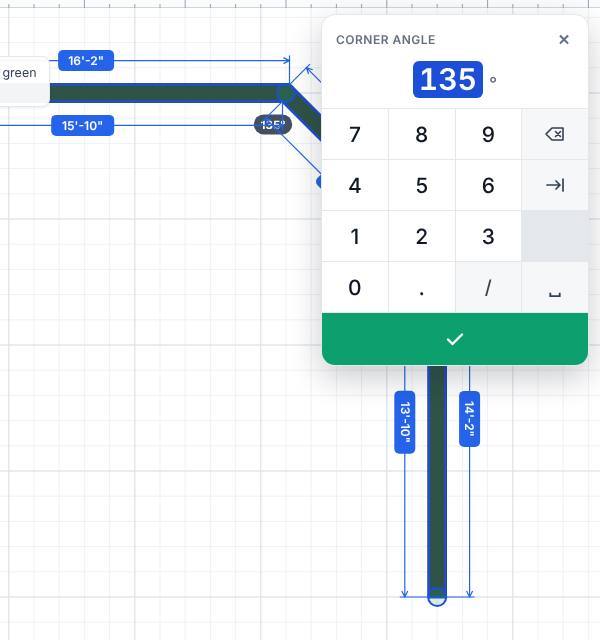
- Tap the angle you want to change. The number pad opens with the title Corner angle.
- Type the angle in degrees, anywhere from 1 to 179, and tap ✓.
What moves
The side after the corner turns around the corner and keeps its length.
- On an open run, everything past that corner turns with it and keeps its shape.
- On a closed outline, only the next corner moves, so the side after it changes to close the shape.
Doors and windows on a side that turns stay at the same spot along that side.
Draw a new wall at an angle
While drawing walls, type the length in Length and the angle in Angle on the bar at the bottom, then press Enter. 0 is to the right, 90 is up, 45 is up and to the right, and 135 is up and to the left.
Related questions
Which angle does the label show, inside or outside?
It shows the angle between the two sides at that corner, the smaller way round (under 180°). A square corner is 90° and a 45-degree bay corner is 135°.
Thanks for letting us know.
Still need help?
Send us a message and a real person on the Terralox team will get back to you, usually the same business day.