
 Troubleshooting
Find an earlier TerraScan site visit
Where to find a visit that's still in progress, or the pins and report of a finished one.
Every pin is saved to your company's account as you drop it, and every visit stays on the property. You can always get back to one from the property's Site Visit panel.
A visit that's still in progress
- Open the property from Properties.
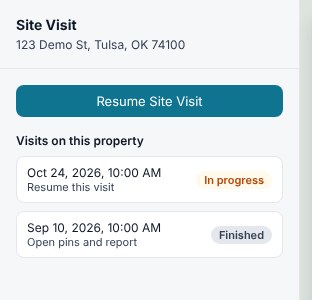
- The Site Visit panel opens the visit that's in progress, with its pins on the map. On a phone, tap Site Visit along the bottom of the map.
- Carry on dropping pins, then click Complete Site Visit.
A finished visit
- Open the property.
- In the Site Visit panel, click ← All visits.
- Click the visit marked Finished. Its pins show on the map and in the panel, with Generate Report (or Regenerate Report) and Download report (PDF).
Related questions
The property says Visit in progress, but I don't see it
A field user sees only the visits they started. If a teammate started the visit, ask them, or an admin, to open and finish it. Admins see every visit in the company: the panel only reopens an admin's own visit by itself, and a teammate's visit is listed under ← All visits with Started by and their name. Pins you drop on it go on their visit.
I started a second visit by mistake
Before October 2026, TerraScan didn't reopen a visit, so you may have two open visits on one property. Click ← All visits, open each one marked In progress, and click Complete Site Visit on the one you no longer need.
Thanks for letting us know.
Still need help?
Send us a message and a real person on the Terralox team will get back to you, usually the same business day.