
 Troubleshooting
TerraModel won't export a video
Fix "This browser can't encode MP4 video" and other problems making or downloading a TerraModel video.
TerraModel makes the video inside your browser, so the browser has to support video encoding. Most problems come from the browser or the device.
"This browser can't encode MP4 video"
You see this when you click Export MP4, and Render MP4 is greyed out.
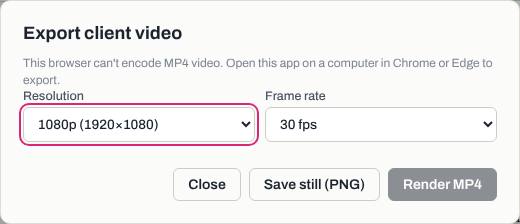
- Open TerraModel on a computer, not a phone or iPad.
- Use Google Chrome or Microsoft Edge, kept up to date.
- Sign in and click Open to load the project from your account.
- Click Export MP4 again.
The video finished but didn't download
- In the export window, click Open in new tab.
- Save the video from that tab (right-click the video, then save it).
The export stopped partway
- Keep the TerraModel tab open and the computer awake until the progress bar finishes.
- Try 720p (1280×720) · smaller file, which is a smaller job.
- If you see "Export cancelled", the render was stopped. Click Render MP4 again.
Save problems
| Message | What to do |
|---|---|
| "Couldn't save to your account … Downloading a file instead." | The project was downloaded as a .terramodel.json file. Keep it, and click Save again when you have signal. |
| "This browser is out of room to auto-save. Use Save to keep a project file." | Click Save now so the project isn't lost. |
| "That file is not a valid project" | Pick a .terramodel.json file saved from TerraModel. |
| "Please use an image under 8 MB" | Use a smaller logo file. |
Was this article helpful?
Thanks for letting us know.
Still need help?
Send us a message and a real person on the Terralox team will get back to you, usually the same business day.