
 TerraModel
Set up the job
Add your company name and logo, pick the foundation type and scope, and adjust the repair details shown in the video.
The settings on the right side decide what the homeowner sees. Every change shows in the preview right away, so press play to check it.
Project and company
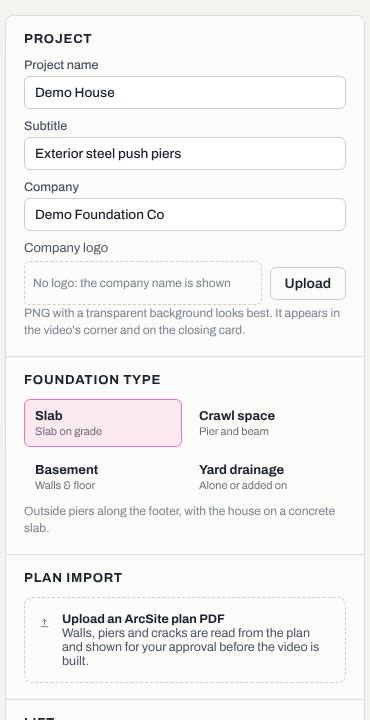
- Type the Project name (usually the address) and a Subtitle, for example "Exterior steel push piers".
- Check the Company name. It starts as the company name on your Terralox account and shows on every scene.
- Your account's logo is used automatically when it has one. To use a different logo for this project, click Upload under Company logo and pick it. A PNG with a transparent background looks best, under 8 MB. It appears in the video's corner and on the closing card. Remove takes it off, and the account logo is used again if there is one.
Foundation type and scope
Pick Slab, Crawl space, Basement or Yard drainage. The settings below change to match.
For a crawl space, the Scope section lists the work in the video: Beam replacement, New piers, Re-level existing beams, Sill plate replacement, Joist replacement and Outside piers. Untick an item to leave it out of the video. Items not on the plan are greyed out.
Repair details
Depending on the type, you'll see sections such as:
- Outside piers: the Pier style (Push pier, Offset steel pier, Helical pier or Pressed concrete piling), the Pier shown up close, Depth shown and Footer depth (measured from finished grade to the bottom of the footer). Tick Mortar repair included if it is.
- Under the floor, New piers and Existing supports for crawl space jobs: crawl space height, beam and joist sizes, the interior pier type and spacing.
- Basement walls: the repair type, spacing, wall height and how much the wall bows.
- Yard drainage: French drain depth and Show the rain test at the end.
- Lift: how much lift is shown, Motion exaggeration and Shims per support.
- Brick crack: the width as found, its length in brick courses, where it is along the wall, and how much it narrows after the lift.
Related questions
Can I show a different pier up close?
Yes. Pick it in Pier shown up close (or Support shown up close for a crawl space).
Thanks for letting us know.
Still need help?
Send us a message and a real person on the Terralox team will get back to you, usually the same business day.