
 TerraModel
 overview
What TerraModel is for, and a tour of the video preview, the step buttons and the job settings.
TerraModel turns a foundation plan into a short 3D video that shows the homeowner how their repair works. Upload an ArcSite plan PDF, check what TerraModel read, set the job details, and export an MP4 that plays on phones and in email.
Open it from your programs page or go to /terramodel/app.
The screen
The Terralox button at the far top left goes to the terralox.com home page; tap the small arrow next to it for My account, Jobs, your other programs, the Help Center and Sign out. Next to it, the top bar shows your company's logo and name from your Terralox account (or the TerraModel logo if your account has no logo yet). Under the name is the kind of job, such as Slab foundation repair or Crawl space repair, then the project name and the number of piers or supports.
The top bar has the buttons you use most:
| Button | What it does |
|---|---|
| New | Start a new project. |
| Upload PDF | Read an ArcSite plan PDF. See Make a video from a plan. |
| Open | Open a saved project. |
| Save | Save the project. |
| Export MP4 | Make the video file. See Export the video and save projects. |
On the left is the video preview. Press play, drag the timeline, or change the speed (0.5×, 1×, 2×). The buttons under it jump to each step, from 00 Intro through 11 Walkaround for a slab pier job. The steps change with the foundation type.
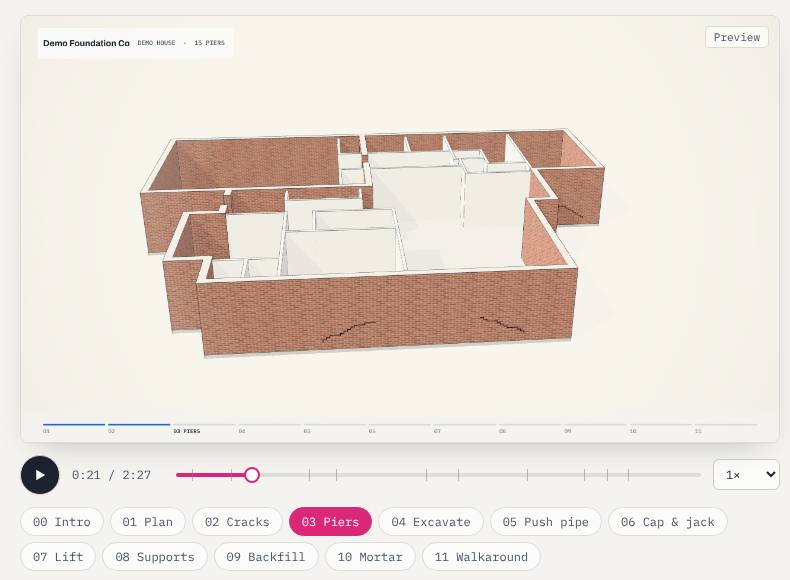
On the right are the job settings: project name, company and logo, Foundation type, Plan import, and the settings for the repair. Every change shows in the preview right away. See Set up the job.
What's in the video
- The whole house built from the plan, with every pier numbered and every crack marked.
- A close-up of one repair from start to finish.
- A closing walkaround, with captions, a step bar and your company name on every scene.
Related questions
Which computer and browser do I need?
Use Chrome or Edge on a computer to export videos. The preview works in other browsers too.
Thanks for letting us know.
Still need help?
Send us a message and a real person on the Terralox team will get back to you, usually the same business day.