
 TerraModel
Export the video and save projects
Render the MP4 for the homeowner, save a still picture, and save or open TerraModel projects.
When the preview looks right, export the video and send it to the homeowner. Save the project too, so you can change it later.
Export the video
- Open TerraModel in Chrome or Edge on a computer.
- Click Export MP4.
- Pick the Resolution: 1080p (1920×1080) or 720p (1280×720) · smaller file.
- Pick the Frame rate: 30 fps or 24 fps.
- Click Render MP4 and wait for the progress bar to finish. Keep the tab open while it works.
- The finished video plays in the window. Click Download MP4, or Share… where your device offers it.
- If the download doesn't start, click Open in new tab and save the video from there.
Save still (PNG) saves a picture of the current frame instead, handy for an estimate or an email.
Save a project
Click Save in the top bar.
- When you're signed in, the project is saved to your company's account, and TerraModel says "Saved … to your account".
- If the account can't be reached, TerraModel downloads a project file (
.terramodel.json) instead.
Open a project
- Click Open.
- Under Your account, click a project to open it. Each row shows when it was saved and which programs have work in it.
- Under This browser, open a project saved on this computer.
- Or click From file… and pick a
.terramodel.jsonfile, for example one a coworker sent you.
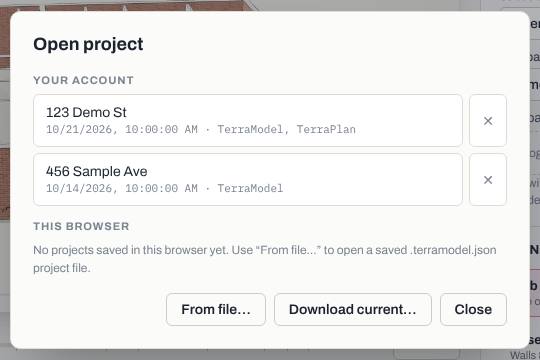
Download current… downloads the open project as a file. The ✕ on a project deletes it.
Related questions
The export button says this browser can't make MP4s
Was this article helpful?
Thanks for letting us know.
Still need help?
Send us a message and a real person on the Terralox team will get back to you, usually the same business day.