
 Account, team and security
Sign in and sign out
Sign in with your email and password or with Google. Signing out signs you out on every device.
One Terralox sign-in covers every program your company has. You stay signed in on a device until you sign out or go 30 days without using it there.
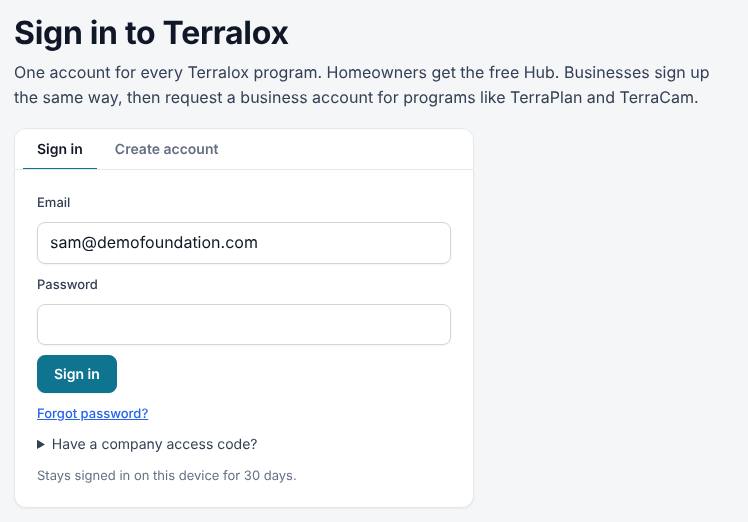
Sign in
- Go to terralox.com and press Sign in at the top right.
- On the Sign in tab, type your Email and Password.
- Press Sign in. If your account uses Google, press Continue with Google instead.
- You go to My account, or straight back to the program you were trying to open.
Sign out
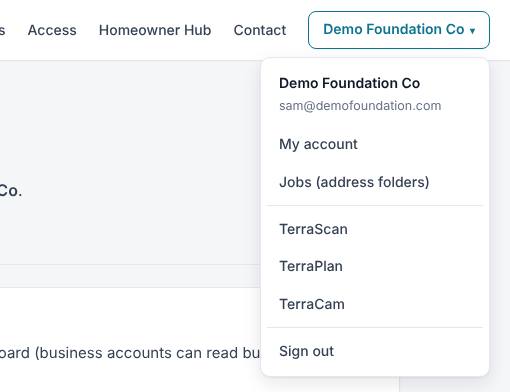
- Press the button with your company's name at the top right of any terralox.com page.
- Press Sign out at the bottom of the menu. (There's also a Sign out button on the Profile tab of My account.)
- You land on the Terralox home page, signed out.
Inside a program, tap the small arrow next to the Terralox button at the top left, then Sign out.
On a shared iPad or office computer, signing out is still the safe thing to do at the end of the day. If you just want to stop using the device for a while, close the tab instead.
Related questions
How long do I stay signed in?
Until you sign out, or go 30 days without using Terralox on that device. Using it restarts the 30 days.
Does changing my password sign me out elsewhere?
Yes. A new password, set on the Profile tab or with Forgot password?, signs you out on every other device. The device you changed it on stays signed in.
I can't sign in
See I can't sign in for what each message means.
Thanks for letting us know.
Still need help?
Send us a message and a real person on the Terralox team will get back to you, usually the same business day.