
 Getting started
Create your Terralox account
Make your free Terralox account with your name, email and a password, or with Google.
Everyone starts with the same free Terralox account: owners, office staff and estimators. Once you have it, a business owner asks for a business account to add programs like TerraPlan and TerraCam.
Steps
- Go to terralox.com and press Sign in at the top right.
- Press the Create account tab.
- Type Your name, your Email and a password of 8 or more characters under Make a password.
- Press Create free account.
- You land on your My account page. Check your inbox for an email from Terralox and press the link in it to confirm your email.
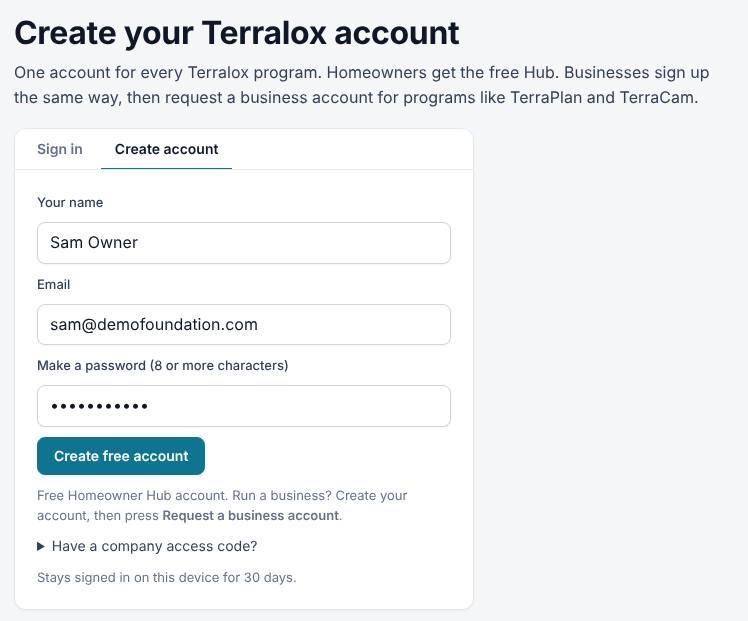
If you see a Continue with Google button, you can press it instead of typing a password. Terralox uses your Google email and you sign in with Google from then on.
After you sign up
- You stay signed in on this device until you sign out or go 30 days without using it.
- To use business programs, the business owner presses Request a business account. See Request a business account and programs.
Related questions
I didn't get the confirmation email
Check your spam folder. On your My account page, press Send a new link in the yellow note at the top. If it still doesn't come, email info@terralox.com and we'll confirm you by hand.
It says that email already has an account
You (or someone at your company) already made one. Use the Sign in tab, or press Forgot password? to set a new password. If it says to use Google, press Continue with Google.
It says too many accounts have been made, or my email can't be used
Our sign-up checks sometimes stop a real person. A box appears under the message: add a short note and press Request a review. We'll look and email you, usually within a day. When it's approved, the link in that email lets you finish making your account.
What's the company access code?
Some companies were set up before personal accounts existed and share one code. If you were given one, open Have a company access code?, type it and press Sign in with code. We suggest everyone moves to their own account so you can invite your team.
Thanks for letting us know.
Still need help?
Send us a message and a real person on the Terralox team will get back to you, usually the same business day.