
 Jobs and crew
Sign in as a crew member
Crews sign in on their phone at terralox.com/crew with the company code and their own 6-digit PIN.
If your manager gave you a company code and a PIN, this is how you sign in. You don't need an email or a password.
Before you start
- Get your company code and 6-digit PIN from your owner or manager. They're on the card or note they gave you.
Steps
- On your phone, go to terralox.com/crew.
- Type the Company code.
- Type Your PIN.
- Tap Sign in.
- If you can use one program, it opens straight away (often TerraCam). If you can use more than one, you land on My account: tap the program you need.
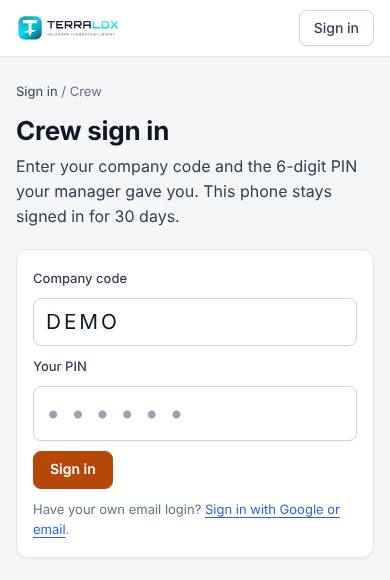
Your phone stays signed in for 30 days. Next time, the company code is already filled in, so you only type your PIN.
What you can do
- Use the programs your manager ticked for you.
- Open Jobs to find a house, get directions and read the notes. See Find and open jobs.
- Change your name on the Profile tab of My account.
Related questions
It says "That company code and PIN don't match"
Check both and try again. After 5 wrong tries, your phone has to wait 15 minutes. If you've forgotten your PIN, ask your manager for a new one.
It says "This login is paused"
Your manager has paused your login. Ask them to turn it back on.
It says crew sign-in is paused
Too many wrong PINs were typed for your company. Wait 15 minutes, or ask your manager.
I got a new phone
Sign in on the new phone with the same code and PIN. Your manager can also make a new PIN if the old phone was lost.
I have my own email login
Use the normal sign-in instead: tap Sign in with Google or email at the bottom of the crew page.
Thanks for letting us know.
Still need help?
Send us a message and a real person on the Terralox team will get back to you, usually the same business day.