
 Jobs and crew
Work offline and sync
TerraPlan and TerraCam keep working with no signal. Your work is saved on the device and uploads when you're back online.
Crawl spaces, basements and rural lots often have no signal. TerraPlan and TerraCam are built for that: keep drawing and shooting, and your work uploads to your account when the signal comes back.
Before you go to the job
- With good signal, sign in and open each program you'll use (TerraPlan, TerraCam) on that device. This saves a copy of the program on the device.
- Open TerraPlan once (it opens on the Projects screen) so the device keeps a copy of your project list.
- Optional: add the programs to your home screen.
On site with no signal
- Open the program as usual. If the signal is weak, it opens from the saved copy after a few seconds instead of hanging.
- Work normally:
- TerraPlan: a message says "No signal. Keep drawing; everything is saved on this device." When you press Save, the plan is held on the device to upload later.
- TerraCam: a message says "No signal. Keep shooting; photos save on this device."
- A small badge in the top bar shows what's waiting, for example Offline · 2 to upload in TerraPlan or Offline · 12 photos waiting in TerraCam.
When the signal comes back
- Keep the program open. Uploading starts by itself.
- TerraCam shows Uploading… and TerraPlan says "Back online: 1 plan uploaded to your account".
- When the badge goes away, everything is in your account and the rest of the team can see it.
What needs signal
- Signing in for the first time on a device.
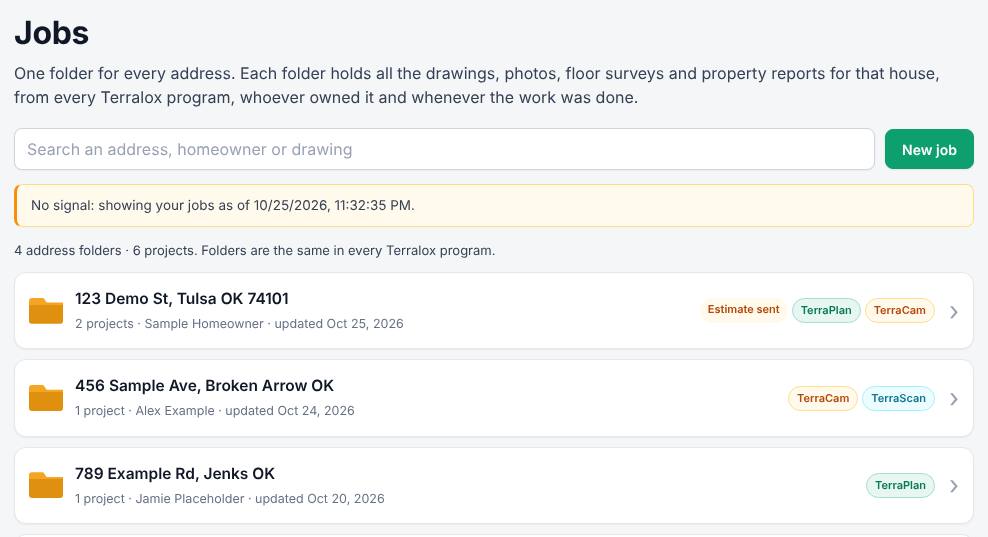
- Changes in a job folder (status, notes, owners, schedule). With no signal it says "No signal. Nothing was saved; try again when you're back online." TerraPlan's Projects screen still shows the device copy of your project list, marked "You're offline", and Job folders shows the device copy of your jobs, marked "No signal: showing your jobs as of ...". The separate Jobs page (terralox.com/jobs) needs signal.
- Address suggestions and map pictures.
Related questions
The badge says something is waiting, but I have signal
Open the program and leave it open for a minute. If it's still waiting, check you're still signed in: open terralox.com/account. Then go back to the program.
Does TerraCam keep every photo on my phone forever?
No. After a photo is safely in your account, the full-size copy on the phone is cleared after about a week to save space.
Other programs?
The offline copy described here is for TerraPlan and TerraCam. Other programs need signal.
Thanks for letting us know.
Still need help?
Send us a message and a real person on the Terralox team will get back to you, usually the same business day.