
 Account, team and security
Add crew members with a PIN
Give field crews a quick phone login with your company code and a 6-digit PIN, no email needed.
Crew logins are for people in the field who don't need an email login, such as installers taking photos in TerraCam. Each crew member signs in on their phone with your company code and their own 6-digit PIN.
Before you start
- You need to be the business owner or a manager.
Add a crew member
- Go to My account and open the Team tab.
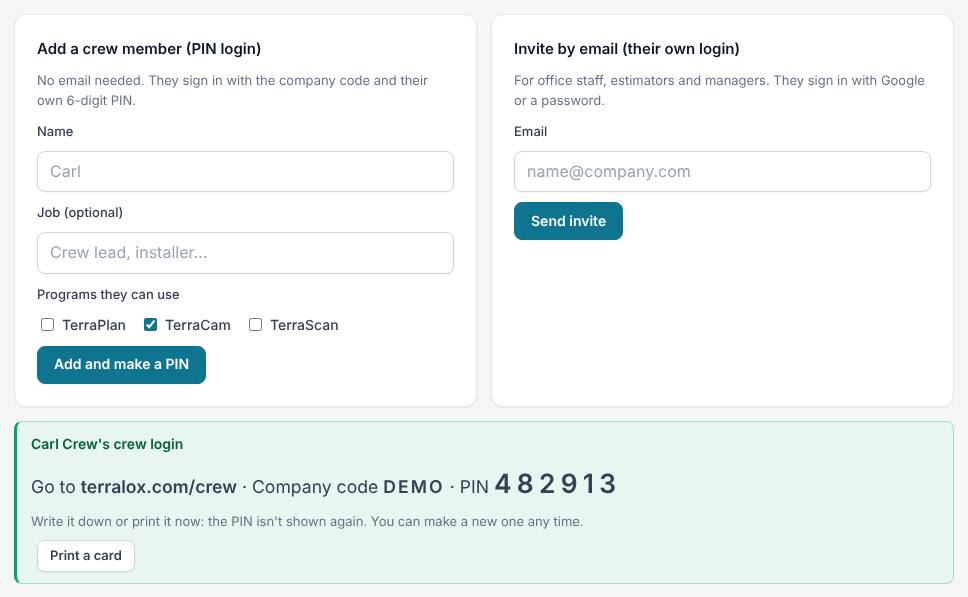
- Under Add a crew member (PIN login), type their Name. Job (optional) can say something like "Crew lead".
- Under Programs they can use, tick what they need. TerraCam is ticked for you.
- Press Add and make a PIN.
- A green box shows their login: the address terralox.com/crew, your Company code and their PIN.
- Write it down or press Print a card. The PIN isn't shown again.
The Crew sign-in box at the top of the Team tab always shows your company code. The owner can change it there with Change code. Crews already signed in stay signed in; new sign-ins use the new code.
Manage crew logins
In the team list at the bottom of the Team tab, each crew row has:
- Programs tick boxes to change what they can open.
- Status: Paused stops the login and signs out any phone using it within about 15 minutes. Active turns it back on (they sign in again).
- New PIN: makes a new PIN. The old PIN stops working right away, and any phone already signed in with it is signed out within about 15 minutes.
- Remove: deletes the crew login. Their phone is signed out within 15 minutes.
Related questions
A crew member keeps getting "That company code and PIN don't match"
Check the company code (letters and numbers, no spaces) and the PIN. After 5 wrong tries, phones on that network wait 15 minutes. Lots of wrong tries across your company pause crew sign-in for 15 minutes, or for the rest of the day. If they've forgotten it, press New PIN and give them the new one.
The Team tab shows wrong PIN tries
That's a count of wrong PINs typed for your company code. A few is normal. Lots of them may mean someone is guessing: change the company code.
Can a crew member use TerraPlan?
Yes, if you tick TerraPlan for them. Crew logins can't be managers and can't invite anyone.
Thanks for letting us know.
Still need help?
Send us a message and a real person on the Terralox team will get back to you, usually the same business day.