
 Account, team and security
Connect your CRM (JobTread)
Connect JobTread once so new jobs show up in Terralox in their address folders, ready to draw.
Terralox is your field tool. Your CRM keeps the customer, status, schedule and warranty. Connect it once and each new job shows up in Terralox in its address folder. JobTread is available now; Jobber and Housecall Pro are listed as coming next.
Before you start
- You need to be the business owner or a manager.
- You need a JobTread login that can see all jobs.
Connect JobTread
- Go to My account and open the Connections tab.
- Press Open JobTread keys. JobTread opens in a new tab.
- In JobTread, make a new key and copy it. JobTread shows it only once.
- Back in Terralox, paste it into Paste the JobTread key.
- Press Connect JobTread. Terralox checks the key, then starts bringing in your jobs. They show up in Jobs within a few minutes.
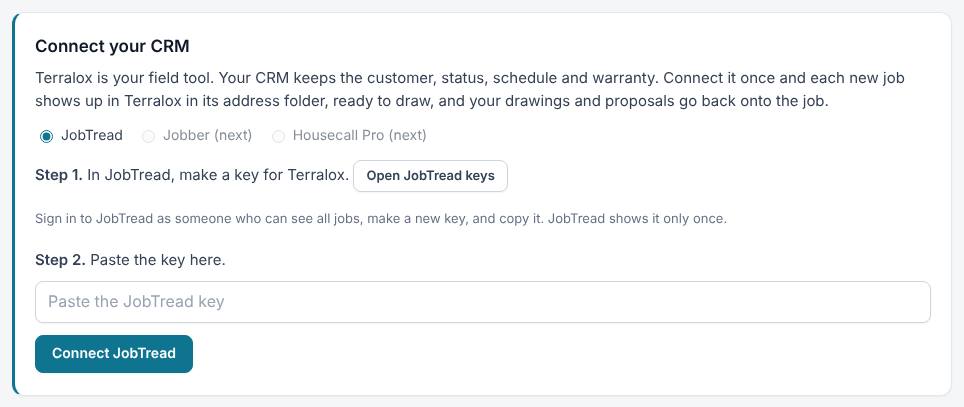
The key goes straight to the Terralox server, which keeps it encrypted and never shows it again. Afterward you only see its last few characters.
Choose which jobs come in
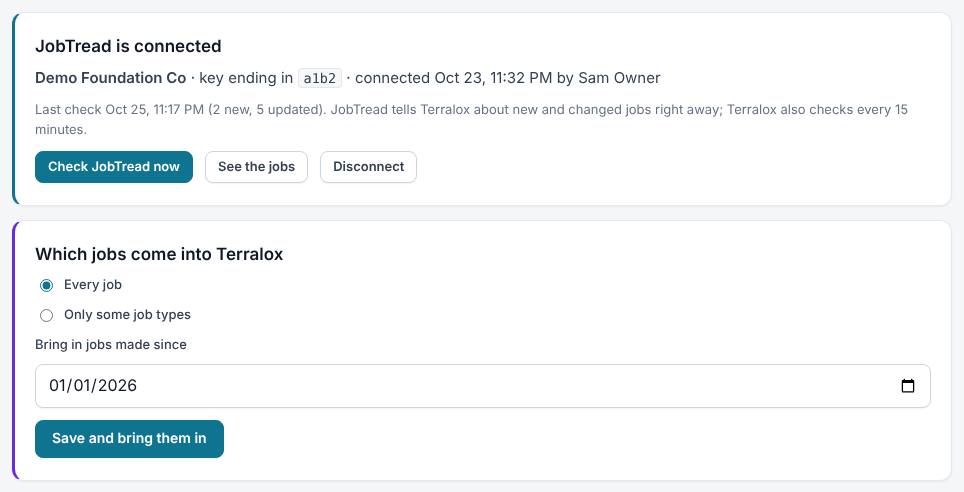
- On the Connections tab, find Which jobs come into Terralox.
- Pick Every job, or Only some job types. For job types, pick the JobTread field that says the job type, then tick the types you want.
- Optionally set Bring in jobs made since to a date.
- Press Save and bring them in.
Once it's connected
- Terralox checks JobTread for new and changed jobs every 15 minutes (the Connections tab says if JobTread also tells Terralox right away). Press Check JobTread now to check immediately.
- In each job folder, a JobTread tab shows the customer, status, schedule and documents from JobTread. These are read-only in Terralox: change them in JobTread. See Inside a job folder.
- Your team sees the jobs. Only owners and managers can change the connection.
Disconnect
Press Disconnect on the Connections tab. Jobs already in Terralox stay; new ones stop coming in. You can also delete the key in JobTread.
Related questions
It says the key didn't work
Make sure you copied the whole key, and that the JobTread user who made it can see all jobs. Then make a new key and paste it again.
My jobs aren't showing up
Give it a few minutes, then press Check JobTread now. Open What the last checks did to see what happened. If you chose Only some job types, check the types you ticked.
Thanks for letting us know.
Still need help?
Send us a message and a real person on the Terralox team will get back to you, usually the same business day.