
 TerraCam
Take photos at a spot on the plan
Tap where you're standing, shoot, and TerraCam pins every photo to that numbered spot.
Each photo belongs to a spot on the plan. Tap the plan where you're standing, then shoot. TerraCam numbers the spots in order (1, 2, 3...) so the report can show where every photo was taken.
Steps
- Open the job and stay on the Plan tab.
- Tap the plan where you're standing. A pulsing orange dot marks the spot and the bottom bar says You're at the marked spot. If you tap near a pier or crack that came from TerraPlan, the spot snaps to it.
- Tap the round camera button at the bottom right.
- Pick tags at the top of the camera if you want them (for example Crack or Exterior). Tags you pick stay on for the next photos.
- Tap the shutter for each photo. Small previews collect along the bottom.
- Tap Done to close the camera. TerraCam shows how many photos were saved.
- Tap the next spot on the plan and repeat.
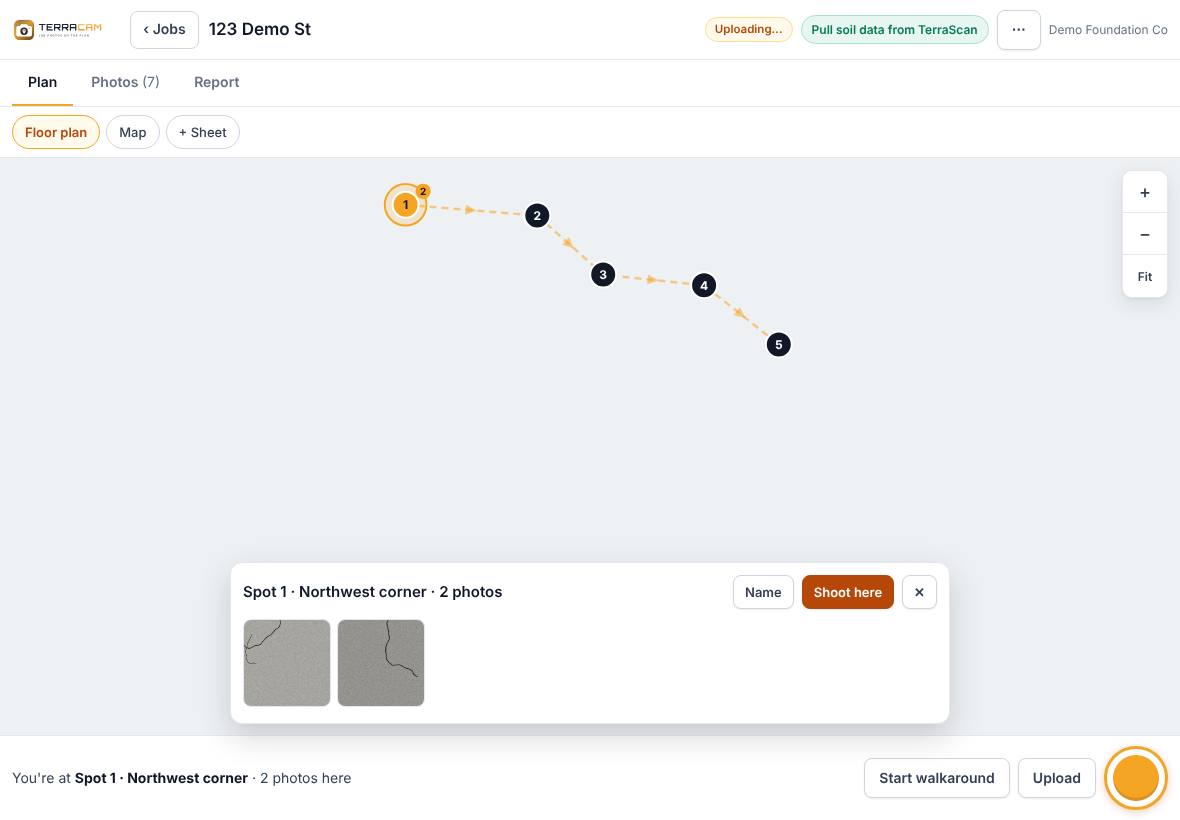
Tap a numbered spot that already has photos to see them. From there, Shoot here adds more photos to that spot and Name gives the spot a name such as "Northeast corner".
Walkaround
Press Start walkaround before you walk the house. TerraCam draws a dashed route from spot to spot as you go. Press End walkaround when you're done. The photo report can put photos in walkaround order.
Before and after photos
In the camera, tap Before or After above the tags. To match an after photo to a before photo, open the before photo and press Take the after photo. The camera shows the before photo faded over the view so you can line it up. The Before photo slider changes how faded it is.
Add photos you already took
Press Upload in the bottom bar and pick photos from the device. They go to the Photos tab without a spot. Open one and press Place on plan, then tap the plan to pin it.
Related questions
What if I take a photo without tapping a spot?
It saves to the job with no spot. It shows under Not on plan on the Photos tab, and you can place it later.
Thanks for letting us know.
Still need help?
Send us a message and a real person on the Terralox team will get back to you, usually the same business day.