
 TerraCam
Make a photo report PDF
Turn a job's photos into a PDF with the plan, numbered photo spots, captions and your company logo.
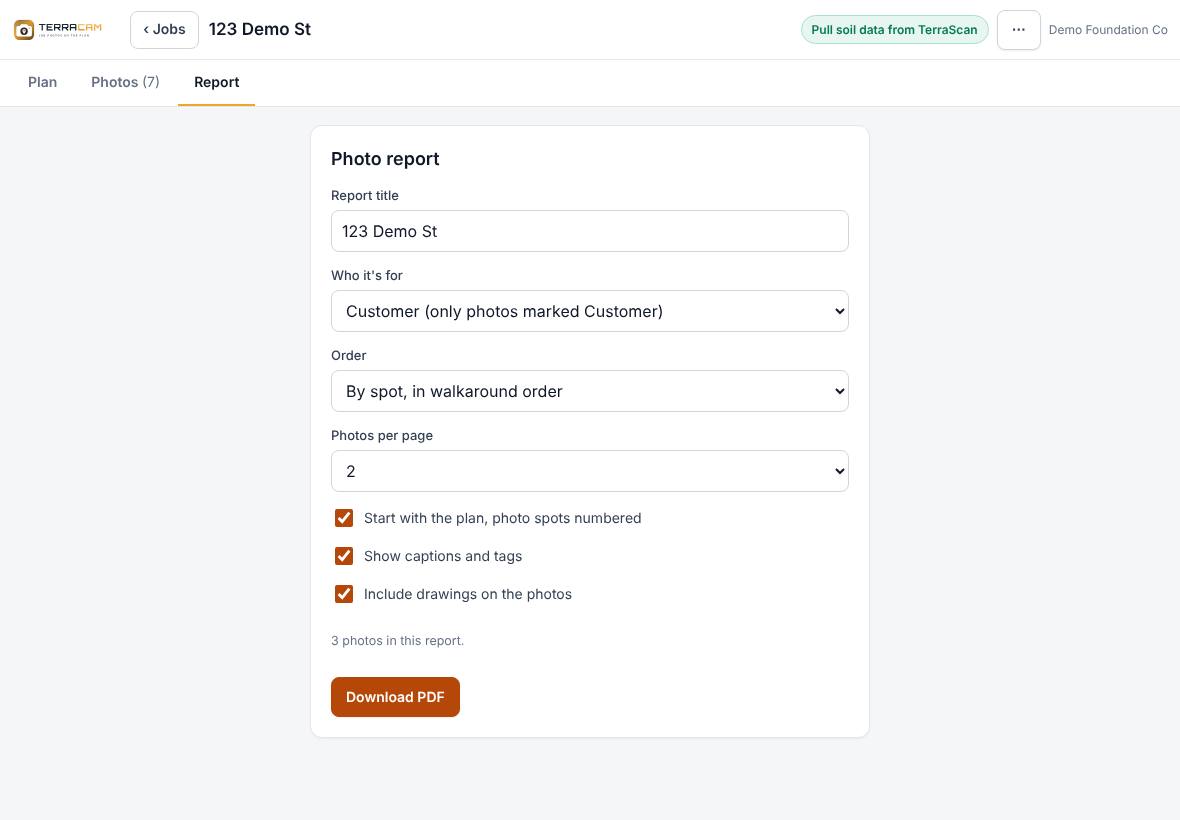
The Report tab builds a PDF of the job's photos that you can email or print. It starts with a cover page, then the plan with each photo spot numbered, then the photos with their numbers and captions.
Before you start
- Mark the photos the homeowner should see as Customer (see Caption, tag and sort photos).
- Add captions. They print under each photo.
Steps
- Open the job and tap the Report tab.
- Check the Report title. It starts as the job name.
- Choose Who it's for:
- Customer (only photos marked Customer)
- Internal (every photo)
- Choose the Order: By spot, in walkaround order, By time taken or By tag.
- Choose Photos per page: 1 (large), 2, 4 or 6.
- Tick or untick the options:
- Start with the plan, photo spots numbered
- Add the satellite map with the photo spots numbered (only shows when the job uses the map)
- Show captions and tags
- Include drawings on the photos
- Check the count under the options, for example "3 photos in this report."
- Press Download PDF. The button says Building… while it works, then the PDF downloads.
What's in the PDF
- Cover: your company logo (if your account has one), the title, the customer name, who prepared it, the number of photos and the dates they were taken.
- Plan pages: each plan sheet that has photos, with numbered spots. The numbers match the photo labels.
- Photo pages: each photo with its number, spot name, BEFORE or AFTER, and (if ticked) the caption, tags and time.
- Every page has a page number.
Related questions
The count says 0 photos for a customer report
No photos are marked Customer yet. Open the photos you want to share and tap Customer under Who can see it, or select several on the Photos tab and press Customer.
A page says "Photo not available on this device"
That photo hasn't finished downloading to this device. Connect to signal, wait a moment and make the report again.
Was this article helpful?
Thanks for letting us know.
Still need help?
Send us a message and a real person on the Terralox team will get back to you, usually the same business day.