
 TerraScan
Diagnose a property
Tick what you see at the house and let the Oklahoma Foundation Brain rank the likely causes, what to measure next and the repair options.
Diagnose combines the property's ground data (soil, geology, drought, flood zone, tree canopy, creeks and more) with what you tick off at the house. It returns a ranked list of likely causes, with the reasons for and against each one.
Steps
- Open the property and click Diagnose in the top bar. The panel opens on the right (on a phone, tap Diagnose at the bottom).
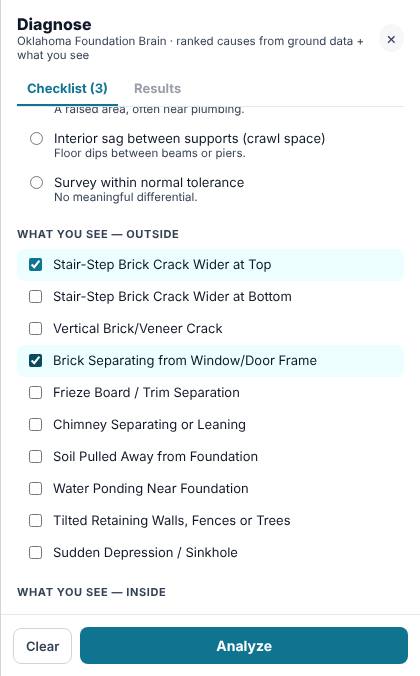
- On the Checklist tab, pick the Elevation survey pattern if you've taken floor readings, for example One corner low. Leave Not measured yet if you haven't.
- Tick what you see under What you see — outside and What you see — inside, for example Stair-Step Brick Crack Wider at Top.
- Tick anything you noticed around the house in the groups below.
- Click Analyze. If nothing is ticked, the button says Show ground risks and shows what the ground alone makes likely.
Read the results
The Results tab shows:
- Likely causes, ranked Most likely, Likely, Possible or Less likely. Click Why, and what to check ▼ on a cause to see Points toward it, Points against it, Confirm with and Rule out.
- What's making it worse: conditions at this property that add to the problem.
- Measure next: the readings that would settle the question.
- Repair options, each marked Primary, Supporting or Not suitable.
- This property's ground: the ground facts it used, with a link to the USDA soil description when there is one.
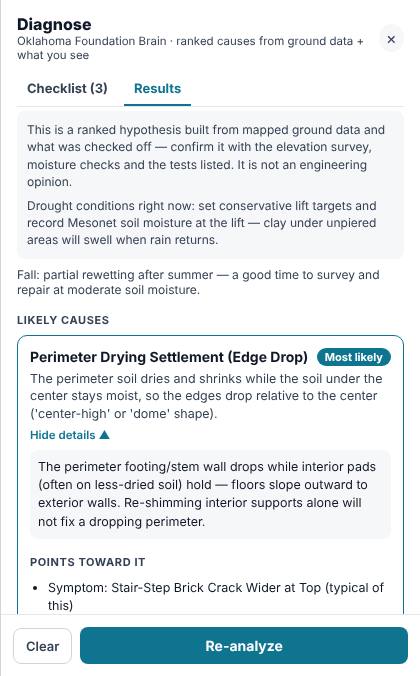
Change the checklist and click Re-analyze to update the results. Clear empties the checklist.
Related questions
Is my checklist saved?
Yes, on this device. If you open the same property on this device later, your ticks are still there. They don't move to other devices.
Thanks for letting us know.
Still need help?
Send us a message and a real person on the Terralox team will get back to you, usually the same business day.