
 TerraBrain
Ask TerraBrain a question
Type a question, read the answer and its sources, follow up, and manage your past conversations.
Ask TerraBrain anything about your jobs, your process or Oklahoma foundations. For example: "How deep do our piers usually go?" or "What causes stair-step cracks in Tulsa clay?"
Steps
- Open TerraBrain at
/terrabrain/app. You start on the Ask tab. - Type your question in the box at the bottom.
- Press Ask, or press Enter. Use Shift + Enter for a new line.
- While it works you'll see "Looking through your records and the foundation knowledge…".
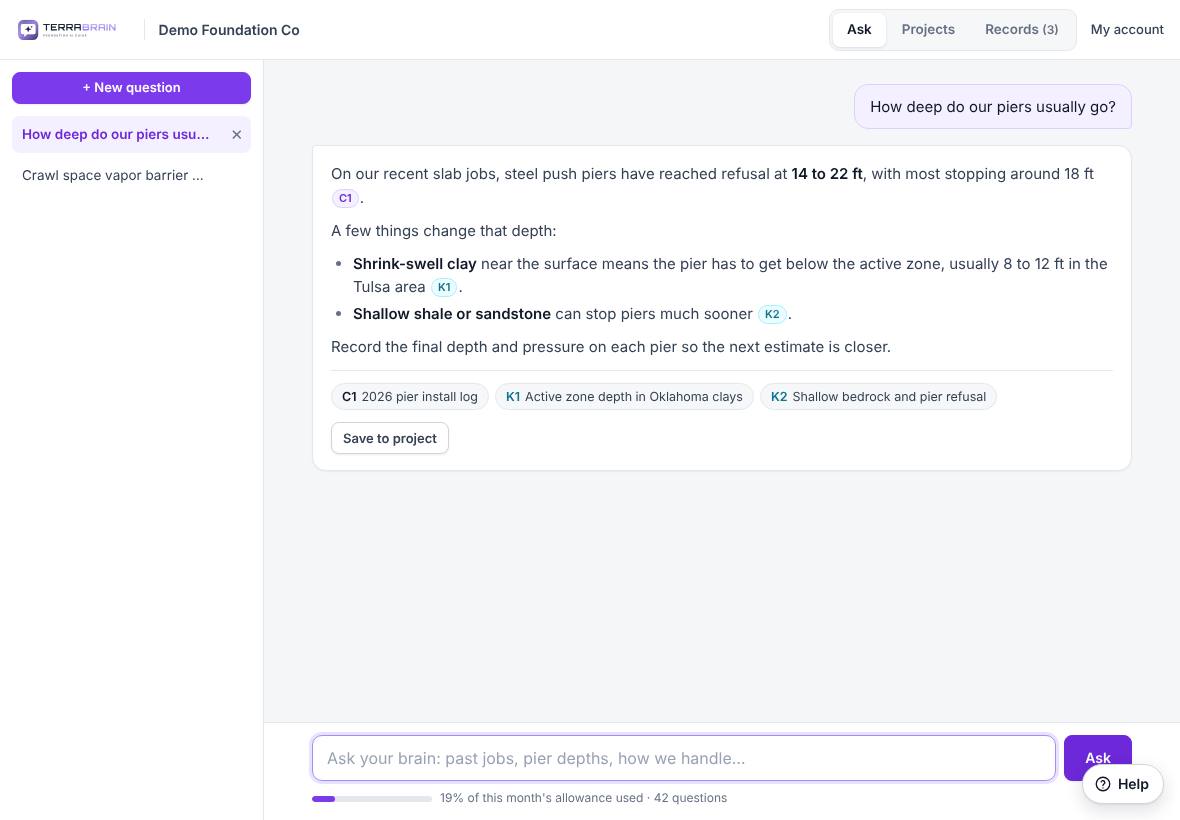
- Read the answer. Small tags in the text show which source each point came from.
- Ask a follow-up in the same box. TerraBrain remembers the conversation.
Read the sources
The sources are listed under each answer:
- C1, C2… are your company's records, for example "2026 pier install log".
- K1, K2… are Terralox's Oklahoma foundation knowledge.
Hold the pointer over a tag in the text to see the source's name.
Your conversations
- Each question you start becomes a conversation in the list on the left, named after your first question.
- Click one to open it again.
- Click ✕ next to a conversation to delete it.
- Click + New question to start fresh. A new conversation is better than a long one when you change topics.
Your conversations are your own. Your teammates don't see them unless you save an answer to a project.
Related questions
Does it make things up when it doesn't know?
It's told never to invent job details, measurements or names. If your records don't cover the question, it says so and answers from the Oklahoma foundation knowledge, telling you which is which.
Thanks for letting us know.
Still need help?
Send us a message and a real person on the Terralox team will get back to you, usually the same business day.