
 TerraBrain
 overview
What TerraBrain is for, and a tour of the Ask, Projects and Records tabs.
TerraBrain is your company's private brain. Ask it a question in plain words and it answers from two places: the records your company imported (pier logs, job notes, checklists) and Terralox's Oklahoma foundation knowledge on soils, causes and repairs. Every answer shows where it came from.
Only your own team can use your brain. No other company can see your records.
Open it from your programs page or go to /terrabrain/app.
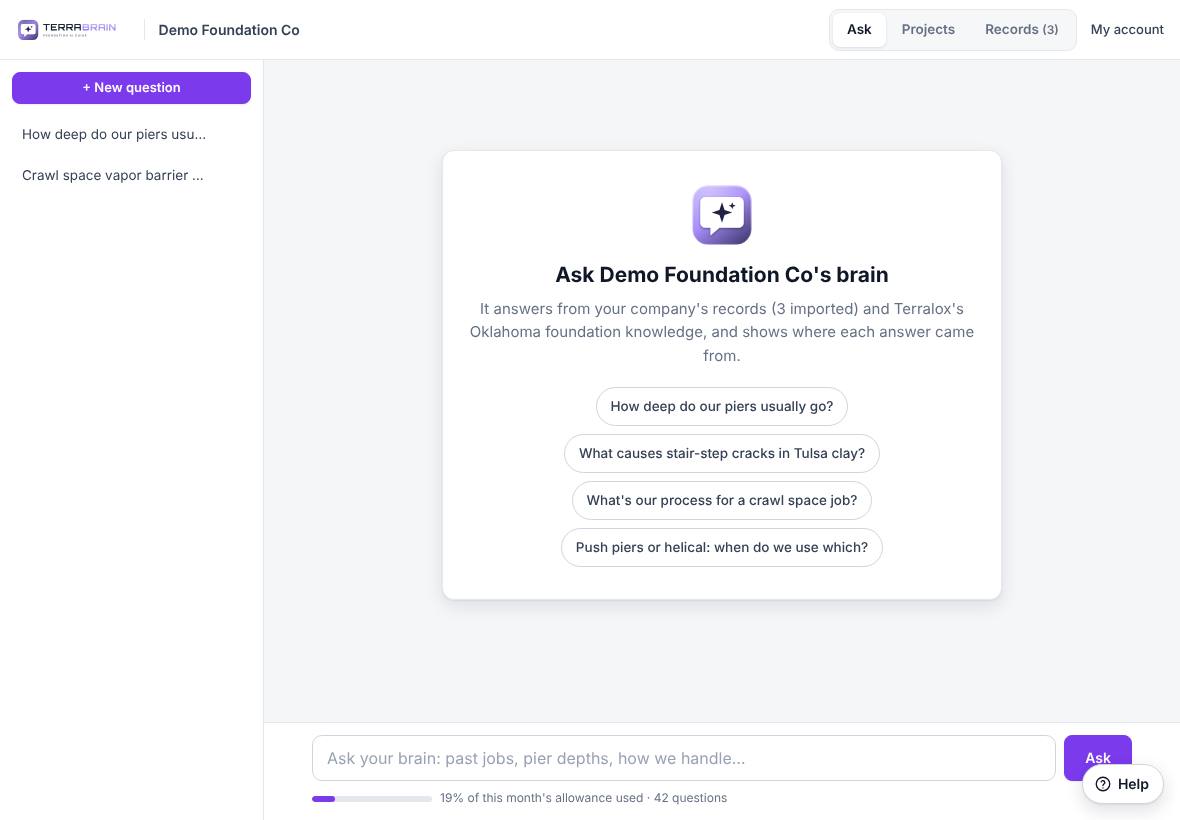
The screen
The top bar shows your company name, three tabs and My account. The Terralox button at the far top left goes to the terralox.com home page; tap the small arrow next to it for My account, Jobs, your other programs, the Help Center and Sign out.
| Tab | What it's for |
|---|---|
| Ask | Ask questions and read the answers. Your past conversations are listed on the left. |
| Projects | Answers your team saved to a job. |
| Records | The files and notes your brain answers from. The number shows how many there are. |
On the Ask tab:
- + New question starts a fresh conversation.
- Click a past conversation on the left to open it again. On a phone, tap ☰ to see the list.
- The box at the bottom is where you type. The bar under it shows how much of this month's allowance your company has used and how many questions have been asked.
- A new brain shows a few starter questions. Click one to try it.
Related questions
Who can add records?
The account owner and managers. Everyone else on the team can ask questions and save answers. See Add records to your brain.
Can a homeowner use our brain?
No. TerraBrain is for your own team: owners, office staff, estimators and crews.
Thanks for letting us know.
Still need help?
Send us a message and a real person on the Terralox team will get back to you, usually the same business day.