
 TerraBrain
Add records to your brain
Import pier logs, job notes and checklists, or write a note, so TerraBrain can answer from your company's own know-how.
The more of your own records TerraBrain has, the better it answers questions about how your company works. Owners and managers add records on the Records tab.
Before you start
- You need to be the account owner or a manager. Other team members see "Your account owner or a manager adds records to the brain."
- TerraBrain reads PDF, Word (.docx), Excel (.xlsx, .xls, .xlsm), CSV, text, Markdown, JSON and web page files.
Import files
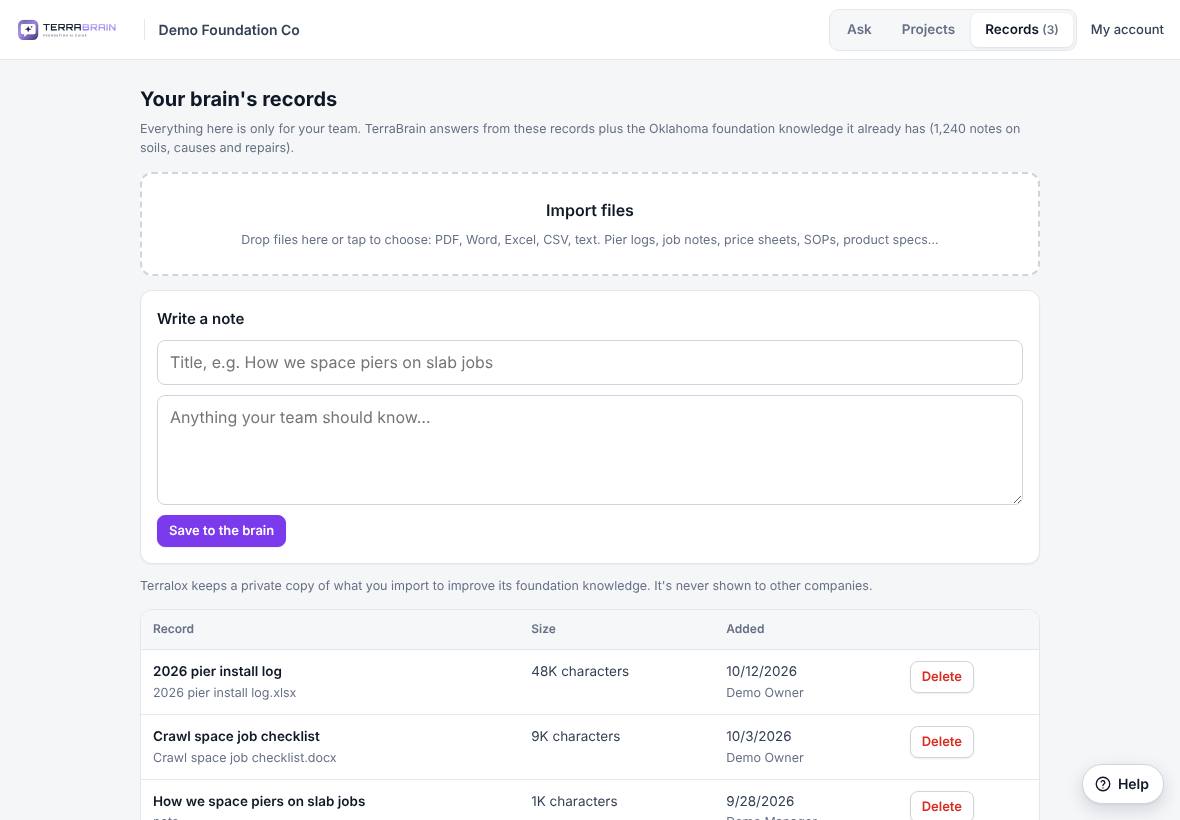
- Click the Records tab.
- Drag files onto Import files, or tap it to choose them. You can pick several at once.
- TerraBrain shows "Reading … (1 of 3)…" and then "Saving …" for each file.
- When it's done it says how many files were imported. Your brain can use them right away.
Write a note
- On the Records tab, find Write a note.
- Type a Title, for example "How we space piers on slab jobs".
- Type the note in the box below it.
- Click Save to the brain.
Notes are good for things that live in people's heads: rules of thumb, how you handle a tricky crawl space, what to check before a crew leaves.
Remove a record
- Find the record in the list on the Records tab. Each row shows its size, the date it was added and who added it.
- Click Delete and confirm. TerraBrain stops using it in answers.
Related questions
What kinds of records help most?
Pier install logs with depths and pressures, job checklists, standard procedures and product specs. Records with real numbers give the most useful answers.
Was this article helpful?
Thanks for letting us know.
Still need help?
Send us a message and a real person on the Terralox team will get back to you, usually the same business day.